Centeye Lumen · AI governance and registry

Your people paste client data into AI tools nobody approved.

Lumen finds every AI tool in use and what it can reach, gives each one an owner, and acts on your rules.

67% of people using AI on work devices used accounts that weren’t the company’s. Verizon 2026 Data Breach Investigations Report

Not ready for a trial? Get the free AI Exposure Check: what AI your clients use and what it can reach.

Part of the Centeye platform · People security

Centeye Lumen
  • The AI register
  • Pastes and uploads
  • Personal AI accounts
  • Forgotten AI app access
  • Risky browser extensions
  • Agentic browser actions
  • Policy that acts
  • Coaching in the moment
Works withMicrosoft 365Google WorkspaceChromeEdgeWindows

What is AI governance and registry?

Your people already use ChatGPT, Claude, Gemini, Copilot and a dozen AI note-takers, and AI agents now work inside their browsers. Lumen is the governance and registry platform for all of it. It finds which AI tools are in use and by whom, shows what data goes out and which access is riskiest, and acts on your rules: coach, block or revoke. Every tool then lands in one register with an owner and a review date. AI stays an advantage, not a leak.

Most data leaving a company today doesn’t go out by email. It goes into a chat window, a browser extension, or an AI app someone connected to their mailbox with two clicks. AI governance means knowing every AI tool and agent in use, giving each one an owner and a review date in a single registry, setting what is allowed, and acting when the rules are broken. It is how you bring shadow AI under control without banning it.

Lumen is governance and protection in one: a register of every AI tool, policies people actually follow, and the power to cut off what breaks them, whether a person or an AI agent is doing the work.

Capabilities

What Centeye Lumen takes care of.

Each capability with a real situation: what happens, and what Lumen does about it.

  1. 01

    Data going out

    Sees when company data is pasted or uploaded into an AI tool, and how much, including through personal accounts. It never reads the content.

    A What happens

    A recruiter pastes a large block of text into a free AI chatbot from a personal account.

    B What Lumen does

    Lumen records the size, the destination and the personal sign-in as a possible disclosure, without reading a word of it.

  2. 02

    Connections nobody remembers

    AI apps people connected to their mail and files, and old consents and sessions still open long after anyone used them, quietly reaching your data.

    A What happens

    An AI note-taker someone tried once in March still has full access to their mailbox and calendar in October.

    B What Lumen does

    Lumen flags the access as unused for months and revokes it at your setting, checked at Microsoft or Google.

  3. 03

    Agentic browser security

    AI now works inside the browser. Lumen applies data-loss rules to each action, a paste, an upload, a sign-in with a personal account, so nothing slips out unnoticed.

    A What happens

    An AI browser agent filling in a form tries to upload the customer list to a site outside your approved tools.

    B What Lumen does

    Lumen applies your data rules to that one action, blocks the upload, and lets the rest of the task carry on.

  4. 04

    Policy that acts

    Cut off an AI site, a browser extension or an app’s access, and revoke one specific grant, on the rules you set. Every revoke can be undone.

    A What happens

    A browser extension that promises AI summaries asks to read every page your staff open.

    B What Lumen does

    Lumen blocks the extension across the company and tells the people who installed it why.

  5. 05

    The AI register

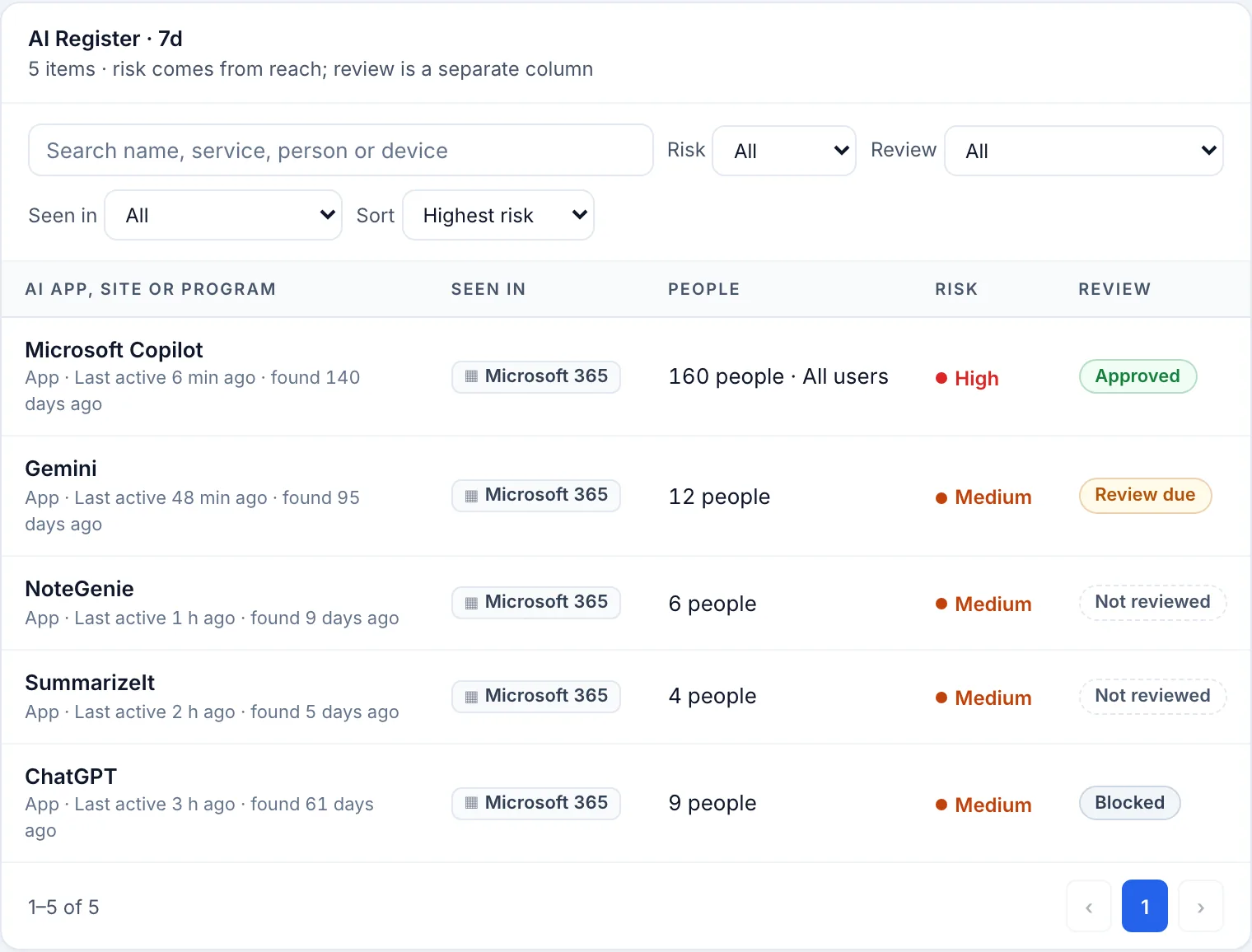
    Every AI tool in use, who uses it, what it can reach, who owns it, and when it is next reviewed. Your AI policy, written down and kept current.

    A What happens

    Finance starts using a new AI spreadsheet assistant nobody told IT about.

    B What Lumen does

    Lumen adds it to the register with who uses it, what it can reach and an owner to approve it, and sets its review date.

  6. 06

    Coaching in the moment

    When someone is about to break policy, Lumen tells them why and points them to the approved tool, so people learn instead of working around it.

    A What happens

    Someone is about to upload a contract to a personal AI account.

    B What Lumen does

    Lumen shows a short note on the rule and a link to the approved AI tool, and the contract goes there instead.

In the console

See Centeye Lumen at work.

Real screens from the Centeye console. The clients, people and data in them are made up.

Lumen AI register: Microsoft Copilot, Gemini, NoteGenie, SummarizeIt and ChatGPT with the people using each, a risk level and a review status.
The AI register for each client. Every AI app in use, how many people use it, how much it can reach, and whether it was approved, blocked or still needs a review.Real Centeye screen · sample data, client names are made upFull size ↗

Under the hood

What Centeye Lumen reads, and how it gets sharper.

What it reads

AI tools in use
Which AI sites, apps and browser extensions are in use, and by whom.
What goes into them
How much data is pasted or uploaded, to which AI service, from a work or a personal account. Never the content.
AI app access
Every AI app connected to mail, files or calendars, and what each grant allows.
Personal accounts
Sign-ins to AI tools with personal accounts on company devices.
Agents in the browser
What AI agents working in the browser are doing, one action at a time.

How detection gets stronger

A catalogue of AI services
Each AI vendor carries its own risk rating, so a new tool is judged the day it appears.
Owners and review dates
Nothing stays approved forever. Every AI tool comes back up for review.
Checked at the source
Every revoke is confirmed at Microsoft or Google afterwards.
Undo is built in
Restoring a grant puts access back exactly as it was.

How it works

It detects, connects the dots, and fixes it.

Lumen doesn’t stop at an alert. Praxis links what it finds to the rest of the attack, then fixes it at the setting you choose.

  1. 01

    Detects

    Spots what is wrong, as it happens.

    • AI tools in use, by whom
    • Company data pasted or uploaded
    • Connections left open
  2. 02

    Connects the dots

    Links it to everything related, in one case.

    • The person and their device
    • The app’s access to mail and files
    • Agents that app is running
  3. 03

    Fixes it

    On your dial: tells you, asks first, or handles it.

    • Coach the person
    • Block the site or extension
    • Revoke the access
On your dial Tell me Centeye finds it, explains it and recommends the fix. You do the rest.Ask me first Centeye prepares the fix and runs it the moment you approve, from a phone if needed.Handle it Centeye fixes it on its own, checks it worked, and tells you after.

In action

Centeye Lumen in action.

Pick a case to see what happened, what Centeye saw, and what it did.

Payroll, into a personal chatbot

Wednesday, 3:12 pm

  1. What happened

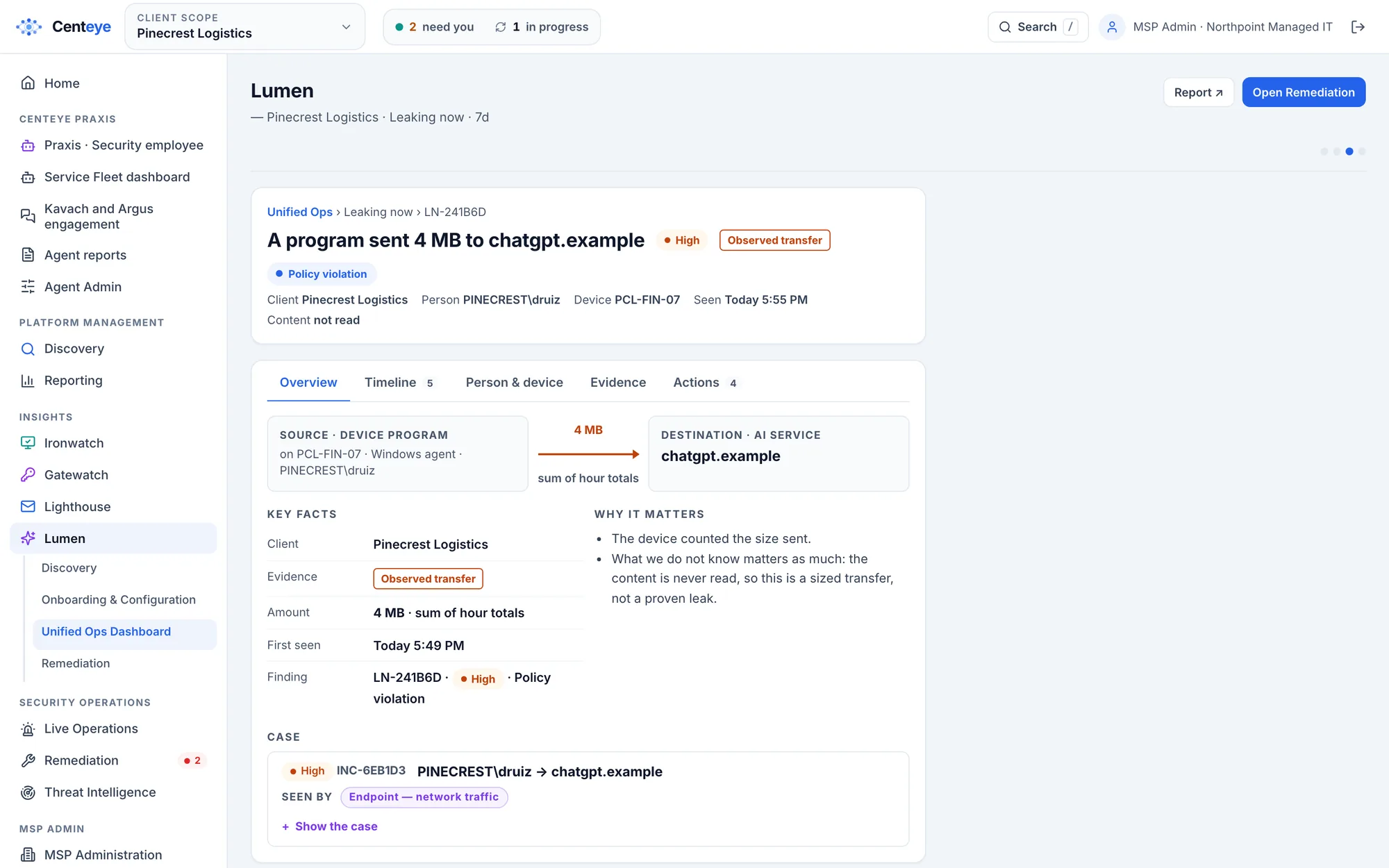
    Someone in finance drags a payroll spreadsheet into a personal ChatGPT account to tidy it up.

  2. What Centeye saw

    Lumen sees 4 MB of spreadsheet data going to an AI service under a personal sign-in, and marks it as a possible disclosure.

  3. What it did

    The person sees a short note pointing to the company’s approved AI tool. Their manager gets a summary, and personal AI accounts are blocked for company data from then on.

Getting started

Try Centeye Lumen on your own tenant.

Connect Microsoft 365 or Google Workspace in under 10 minutes to see every connected AI app. Add the Chrome and Edge extension and the Windows sensor for the browser and laptop view.