Centeye Ironwatch · Endpoint detection and response

Ransomware locks one laptop, then every laptop.

Ironwatch is a light agent for Windows and Mac that spots ransomware early and stops it spreading. It works beside Microsoft Defender.

48% of breaches involved ransomware. Verizon 2026 Data Breach Investigations Report

Part of the Centeye platform · People security

Centeye Ironwatch
  • Malware on arrival
  • Ransomware behaviour
  • Process family trees
  • PowerShell and scripts
  • Remote-access tool abuse
  • Defender switched off
  • Changes in sensitive files
  • Rare programs across machines
Works withWindowsmacOSMicrosoft DefenderStandard RMM toolsStandard PSA tools

What is endpoint detection and response?

Ironwatch is a lightweight agent for Windows and Mac. It watches what runs on each machine, follows every program back to what started it, catches malware and the people driving it, and can stop a ransomware process the moment it is spotted. With your approval it can also cut the laptop off the network and roll files back from a snapshot. It works beside Microsoft Defender, not against it.

Antivirus asks one question: is this file known to be bad? Endpoint detection and response (EDR) also watches how the machine behaves: what starts, what it changes and what it talks to. That is how it catches attacks nobody has seen before, including attackers who use ordinary admin tools.

Ironwatch does both, and it reads what Microsoft Defender already found. You get one view of every machine and one response, instead of two tools that don’t talk.

Capabilities

What Centeye Ironwatch takes care of.

Each capability with a real situation: what happens, and what Ironwatch does about it.

  1. 01

    Malware and known threats

    Every new file’s fingerprint is checked against live threat intelligence the moment it lands, along with everything Microsoft Defender has already flagged on that machine.

    A What happens

    Someone downloads a “free PDF converter” whose fingerprint matches a known password stealer.

    B What Ironwatch does

    Ironwatch quarantines the file before it runs and watches for the same fingerprint on every machine you manage.

  2. 02

    Behaviour that doesn’t add up

    Ironwatch follows every program back through what started it, checks each machine against core security rules, and learns what normal looks like, so an attacker using ordinary tools still stands out.

    A What happens

    Word opens a command prompt, which starts PowerShell, which downloads a file from a site registered last week.

    B What Ironwatch does

    Ironwatch follows the chain from Word to the download, sees a family tree no document should have, and stops it.

  3. 03

    Ransomware, stopped early

    Hundreds of files changing in seconds, or a program switching off Windows’ own file recovery, is stopped before the damage spreads.

    A What happens

    A program deletes Windows’ file-recovery snapshots and starts renaming hundreds of files a minute.

    B What Ironwatch does

    Ironwatch stops the program, cuts the laptop off the network at your setting, and switches file recovery back on.

  4. 04

    Attackers using your own tools

    Remote-access and admin tools are an attacker’s favourite disguise. Ironwatch knows which ones your team uses, and spots a new one appearing or a familiar one used in an odd way.

    A What happens

    A remote-access tool your team has never used is installed at 2 am and starts a session from abroad.

    B What Ironwatch does

    Ironwatch flags a remote-control tool nobody approved, links it to the account that installed it, and stops it.

  5. 05

    Works with Microsoft Defender

    Keep Defender. Ironwatch picks up its detections, notices if it is switched off, and adds what it doesn’t do on its own: link the attack to its cause and clean up after it.

    A What happens

    Someone switches off Defender’s real-time protection on a finance laptop.

    B What Ironwatch does

    Ironwatch notices within minutes, raises it as tampering, and links it to whatever ran just before.

  6. 06

    Fits the tools you already run

    A small agent people don’t notice, for Windows and Mac. It rolls out through your RMM or device-management tool, and cases arrive as tickets and notifications in the standard PSA and RMM tools you already use.

    A What happens

    A tech rolls Ironwatch out to 200 laptops through the RMM tool on a Friday afternoon.

    B What Ironwatch does

    Machines report in within minutes, and the first case opens as a ticket in your PSA with the full story attached.

In the console

See Centeye Ironwatch at work.

Real screens from the Centeye console. The clients, people and data in them are made up.

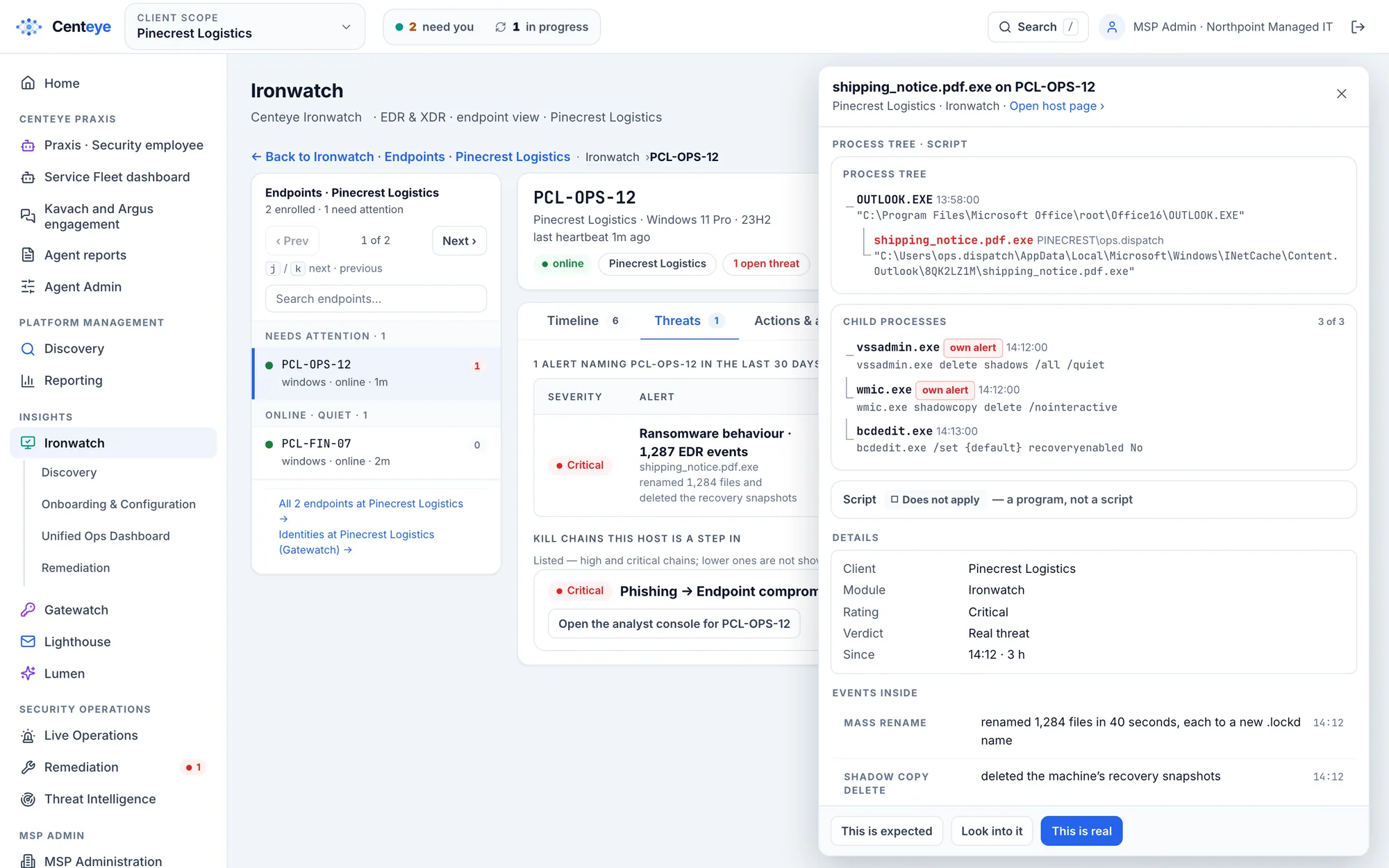
Ironwatch host view: Outlook started shipping_notice.pdf.exe, which ran vssadmin, wmic and bcdedit, renamed 1,284 files and deleted the recovery snapshots.
One laptop, the whole attack. The process family tree from the email attachment to the commands that deleted the recovery snapshots, with what each step did.Real Centeye screen · sample data, client names are made upFull size ↗

Under the hood

What Centeye Ironwatch reads, and how it gets sharper.

What it reads

Every program that starts
With its full family tree: what launched it, with which command, and what it launched next.
Scripts and PowerShell
Read as they run and put together into one readable story, not a thousand log rows.
Sensitive files and settings
Changes in the places attackers use to hide and to come back after a restart.
Network connections
Which program reached out to which address on the internet, and when.
The machine itself
Windows event logs, new services, installed programs and USB devices plugged in.
Microsoft Defender
Its detections and its settings, so switching it off is noticed.
A heartbeat
Every machine checks in, so a silent agent is never mistaken for a clean one.

How detection gets stronger

Live threat intelligence
File fingerprints are checked against current threat feeds, and what is found at one client is watched for at every client you manage.
Trusted files recognised
Genuine Windows and Microsoft files are known on sight, so routine system activity doesn’t raise false alarms.
It learns each client’s normal
The admin script that runs every Monday stops alerting. The one that has never run before doesn’t.
Rarity counts
A script seen on one machine in five hundred matters more than one seen on all of them.
Risk adds up per machine
Three small oddities on one laptop in a day become one case, even if none would alone.
Containment needs evidence
A machine is cut off on evidence and the process family tree, never on one severity score.
It learns from you
Every correction a tech makes teaches Praxis how that client works.

How it works

It detects, connects the dots, and fixes it.

Ironwatch doesn’t stop at an alert. Praxis links what it finds to the rest of the attack, then fixes it at the setting you choose.

  1. 01

    Detects

    Spots what is wrong, as it happens.

    • Malware and known threats
    • Behaviour that isn’t normal
    • Ransomware starting to spread
  2. 02

    Connects the dots

    Links it to everything related, in one case.

    • The login that started it
    • The email that delivered it
    • Every other machine it reached
  3. 03

    Fixes it

    On your dial: tells you, asks first, or handles it.

    • Stop it and quarantine it
    • Cut the machine off the network
    • Remove what it left behind
On your dial Tell me Centeye finds it, explains it and recommends the fix. You do the rest.Ask me first Centeye prepares the fix and runs it the moment you approve, from a phone if needed.Handle it Centeye fixes it on its own, checks it worked, and tells you after.

In action

Centeye Ironwatch in action.

Pick a case to see what happened, what Centeye saw, and what it did.

The shipping notice that wasn’t

Thursday, 4:01 pm

  1. What happened

    Someone in operations opens a “shipping document”. It starts encrypting files in a shared folder.

  2. What Centeye saw

    Ironwatch sees hundreds of files change in seconds from one program, and links it to the email that delivered it an hour earlier.

  3. What it did

    The program is stopped and the file quarantined straight away. The laptop is cut off the network on the on-call tech’s OK from their phone, file recovery is switched back on, and the same file is watched for on every other machine.

Getting started

Try Centeye Ironwatch on your own tenant.

Roll the agent out through your RMM or device-management tool. Machines report in within minutes, and cases arrive as tickets in the PSA you already use.