63 countriestried to sign in to the businesses we protect in 30 daysCenteye platform data, Oct 2026
$3Blost to business email compromise in the US in 2025FBI IC3 2025 Annual Report
67%of people using AI on work devices used non-company accountsVerizon 2026 DBIR
What we see
What your clients are up against right now.
From the businesses Centeye already protects. Each finding arrives with the fix ready for your team.
Same week
password guessing, MFA push-bombing and impossible-travel sign-ins at one business, while its laptops raised their own alerts
Attacks come from more than one side
Tools that watch only sign-ins or only laptops each see half the picture. Centeye watches both for every client, shows them on one page, and puts the fix next to each finding.
The fix
Reset the password
Sign the person out everywhere
Isolate the machine
63 countries
tried to sign in to the businesses we protect in 30 days. Only one in five foreign attempts came from a known hosting, VPN or Tor network.
Blocking countries isn’t enough
Most attempts came from ordinary home and mobile addresses, the kind a country block or VPN list lets straight through. Centeye judges an address by behaviour, not location: new to this business, trying many accounts, failing in a pattern.
The fix
Flagged by behaviour
The fix goes to your team with the evidence
1 in 3
accounts hold an admin role at a 9-person business we watch. The smallest teams have the most admins for their size.
Too many people with admin rights
At a small company one stolen admin account is the whole company. Centeye lists every account with an admin role and flags a new admin grant the moment it happens.
The fix
Remove the admin role for now
Can be undone
Waits for your approval
Source: Centeye platform data across the businesses Centeye protects, October 2026. Sign-in attempts counted over the last 30 days. No client is named.
Your clients’ problems
You’ve had these conversations.
What lands in an MSP’s inbox every week, and how you can answer once Centeye is running. Pick a client.
My account got locked out, and there were dozens of failed logins from another country.
You, with Centeye
That’s someone guessing passwords, and you’re probably not the only target. Centeye sees the pattern across every account, checks whether any guess got in, and if one did, ends that session and resets the password. You hear from us with what happened.
Centeye case · Harbor Dental GroupContained
Password guessing seen on 14 accounts from one source
Someone got into our CFO’s mailbox and almost paid a fake invoice.
You, with Centeye
We’d catch it at the sign-in. Centeye sees the stolen login, the forwarding rule and the fake invoice as one attack, ends the session and pulls the email from every inbox. You get a short note from us: what happened, and that it’s handled.
Centeye case · Maple & Finch AccountingContained
Stolen sign-in, forwarding rule and fake invoice joined into one case
Session ended, rule removed, invoice email pulled from every inbox
RFRiverside Family ClinicPractice Owner · 75 staffCover the laptops
Practice Owner · 11:03 AM
We have Defender. Is that enough if someone clicks the wrong thing at 2 a.m.?
You, with Centeye
Keep Defender. We add the part it doesn’t do on its own: the laptop is isolated, the damage rolled back, and we can see which login started it, on the rules we agreed with you. Nobody waits for the morning.
Centeye case · Riverside Family ClinicContained
Defender alert on a front-desk laptop joined to the login behind it
Laptop isolated on the rules you agreed
Changes rolled back, and the case is ready for review
CECopperline EngineeringChief Operating Officer · 210 staffGet AI under control
Chief Operating Officer · 1:26 PM
Half the team uses ChatGPT, and someone connected an AI note-taker to their mailbox. What can it see?
You, with Centeye
Let’s find out together. Centeye lists every AI tool your team uses, what each one can reach and what data goes into it. We close the access nobody uses and steer people to the tools you approve.
Centeye case · Copperline EngineeringUnder control
23 AI tools found, each with an owner and what it can reach
Note-taker with mailbox access nobody uses: revoked
Coaching shown when company data goes to an unapproved tool
PLPinecrest LogisticsIT Director · 160 staffSecure the AI agents
IT Director · 3:48 PM
We just rolled out Copilot, and finance built an agent that pays invoices. Who is watching it?
You, with Centeye
We are. Every agent gets its own identity, a named owner and only the access its job needs. If the invoice agent does something it never does, we see it, and we can stop it in one step.
Centeye case · Pinecrest LogisticsWatched
Invoice agent registered, with Dana Ruiz as its owner
Access cut down to the folders its job needs
Watched against its normal behaviour, with a one-step pause
We want one team watching people and AI, not five tools that don’t talk.
You, with Centeye
One team, one console. Every attack is one case, whether it started with a person, a laptop or an AI agent, and you get a weekly report you can read in five minutes.
Centeye case · Bayview RealtyCovered
People, laptops, mail, AI tools and agents in one console
The client’s problems are half of it. The other half is running security across 20 or 50 clients with a small team, and making money doing it.
TodayWith Centeye
A different console for every tool, at every clientOne console with every client side by side, and one case per attack
Alerts at 2 am that turn out to be nothingNoise closed with the reason written down; real cases wait with the evidence
Nobody watching at nightThe fixes you allow run within your rules; the rest waits in the morning queue
Hard to show what security did at renewalA plain-English report for every client, every week, written for you
Selling security means stitching vendors togetherOne platform, sold as one line item or a package, per client
Switch or start small
Start where your clients are today.
Switch from the tools you resell now, or add Centeye as one line item and grow from there. Either way, there is no big-bang cutover.
If you’re switching from
Reselling an EDR or MDR
An agent and a service you resell today
Start with identity and email protection: no agent to install, one admin sign-in per client. Then move laptops to Ironwatch client by client as each contract comes up. No big-bang cutover.
Paying for an outsourced SOC
Alerts handled by someone else’s team
Praxis works the cases for every client in your own console, so the client relationship stays with you. Every client starts on “tell me”, and you turn up the automation as trust grows.
Running Microsoft Defender® alone
Common at smaller clients
Keep it. Ironwatch reads what Defender already finds and adds the response it doesn’t run on its own. Add identity and email protection on top, in the same console.
Land and expand
1
Land with one line item
Add identity protection for every client. Account takeover is the attack they see most, and it connects in minutes with no agent.
2
Show what it caught
The first weekly report shows each client what was caught and fixed. That is your case for the next step.
3
Expand with a package
Add email and endpoint as the people package, then AI governance and agent security as each client adopts AI.
Microsoft and Microsoft Defender are trademarks of the Microsoft group of companies.
Packaging
Secure the people first. Then grow with each client’s AI.
Every client needs its people secured today. What comes next depends on how far they have gone with AI.
Lead with the right products for each stage, and add the rest as they grow.
Every client
Secure the people
Account takeover, invoice fraud and ransomware: what every client faces today, whatever they do with AI.
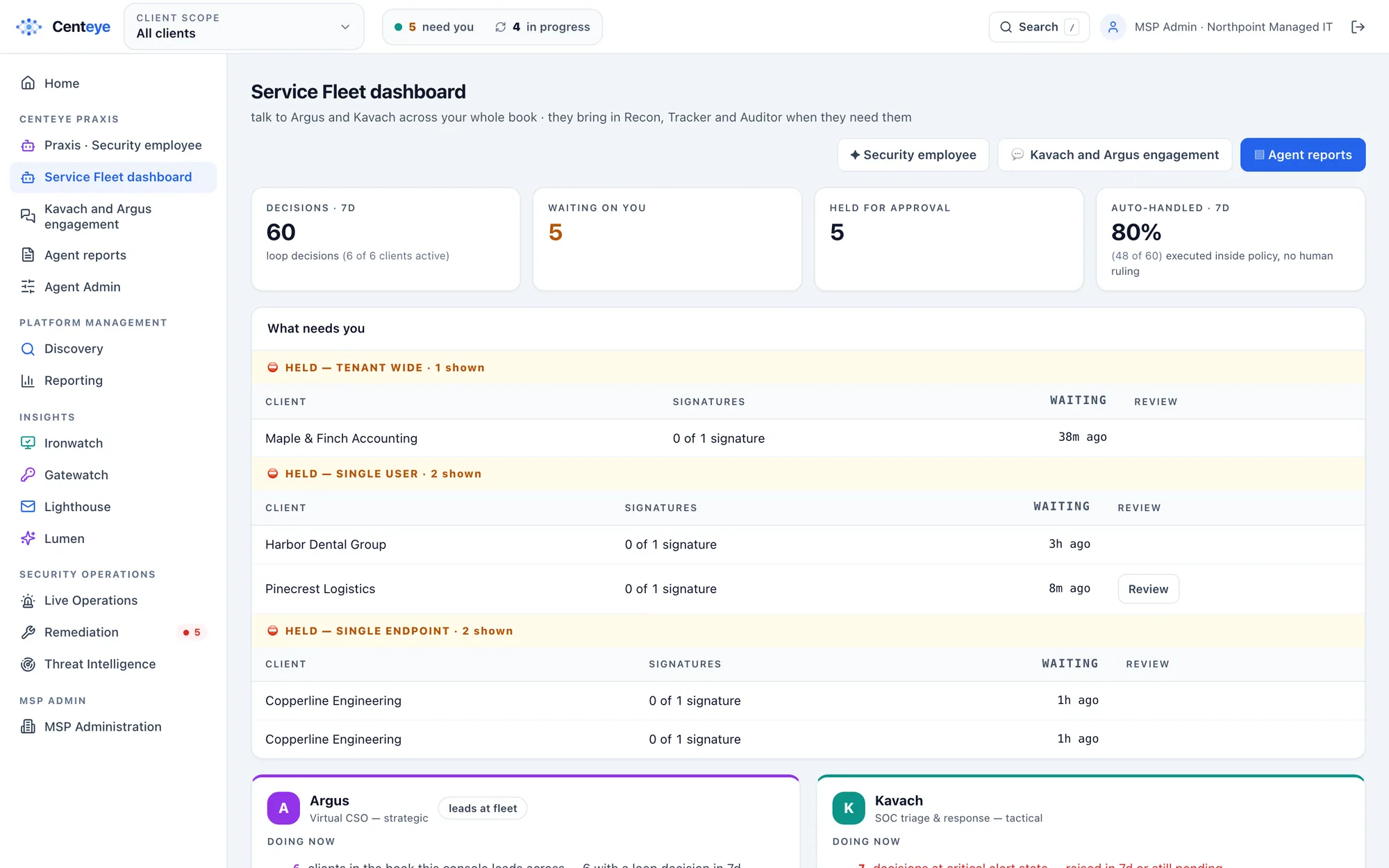
A real screen from the Centeye console. The clients and data in it are made up.
Every client, one queue. What is waiting on you across all your clients, grouped by what it would touch: one user, one laptop or the whole tenant.Real Centeye screen · sample data, client names are made upFull size ↗
Plug and play
A new client, running the same day.
No servers, no new mail flow, nothing for staff to learn.
1
Add a client
An admin approves Centeye in Microsoft 365 or Google Workspace. Most clients are connected in under 10 minutes.
2
Roll out the agent
Push the light Ironwatch agent through your RMM, and the Lumen extension through your browser policy.
3
Plug in your tools
Connect your PSA, and Microsoft Teams, Slack or email for approvals and alerts. Once, for every client.
4
Turn up the dial
Every client starts on “tell me”. Turn each fix up as trust grows, client by client.
The QBR story
Show the client the attack that didn’t land.
One attack across a person, an AI app and an agent, contained in one coordinated response. This is the story your client report tells.
Gatewatch · 9:02 am
A login that isn’t Dana
Her session is copied from a fake sign-in page and replayed from another country.
Lumen · 9:05 am
An AI app she never approved
The attacker connects an AI note-taker to her mailbox: a way back in that survives a password reset.
Synthwatch · 9:11 am
Her agent goes off script
The finance agent Dana owns starts reading hundreds of files far outside its normal job.
Praxis · 9:13 am
One case. One response.
Kavach links all three. Sessions end, the app is revoked and the agent’s access is cut, each checked at Microsoft. Argus writes it up.
Separate tools would see three small alerts at three different times. Centeye sees one attack on a person, her AI
app and her agent, and contains all three in one coordinated response.
Try it with a few clients
Start with a handful of clients.
See what Centeye finds in their tenants and how much time it gives back, then roll it out across your book. What you learn shapes what we build next.