Centeye Gatewatch · Identity threat detection and response

Attackers don’t break in any more. They log in with a stolen password.

Gatewatch watches every sign-in in Microsoft 365 and Google Workspace and shuts out the ones that aren’t your people.

Get a free evaluation

About you

How many customers do you manage?

Rather talk first? Book a 30-minute call.

63 countries tried to sign in to the businesses we protect in 30 days. Centeye platform data, Oct 2026

Not ready for a trial? Run the free Identity Exposure Check, a read-only report in about 10 minutes.

Part of the Centeye platform · People security

Centeye Gatewatch
  • Stolen sessions
  • Impossible travel
  • Password sprays
  • MFA prompt floods
  • New admins and dormant accounts
  • Hidden inbox rules and forwarding
  • Risky app consent
  • AI assistants opening files
Works withMicrosoft Entra IDMicrosoft 365Google Workspace

What is identity threat detection and response?

Most attacks today don’t break anything. They sign in with a stolen password or a stolen session. Gatewatch watches every sign-in across Microsoft 365 and Google Workspace, spots the ones that aren’t really your people, and shuts them out before money or data moves.

Identity threat detection and response (ITDR) watches the accounts people sign in with, not the laptops they use. For every login it asks two questions: is this really the person, and should this account be doing this?

It matters because attackers now steal live sessions in the middle of a login, which gets them past multi-factor authentication. Once inside one mailbox they set quiet rules, read invoices and wait for the right moment to ask for a payment. ITDR catches the login and everything the attacker does after it.

Capabilities

What Centeye Gatewatch takes care of.

Each capability with a real situation: what happens, and what Gatewatch does about it.

  1. 01

    Sign-ins that aren’t your people

    Logins from anonymising networks, impossible travel between two cities, and stolen sessions replayed from someone else’s machine.

    A What happens

    A sales lead signs in from Chicago at 9:00, then again from Lagos at 9:20, on a browser her laptop has never used.

    B What Gatewatch does

    Gatewatch marks the trip as impossible, checks the session against her laptop, and ends the foreign session.

  2. 02

    Password and MFA attacks

    Password sprays across many accounts at once, and floods of sign-in prompts sent to wear someone down until they tap approve.

    A What happens

    An engineer gets 14 sign-in prompts in six minutes late at night and finally taps approve.

    B What Gatewatch does

    Gatewatch recognises the prompt flood, treats that approval as suspect, ends the session and asks the engineer to confirm.

  3. 03

    Accounts gaining power

    A user suddenly made an admin, an account dormant for months waking up, or a new sign-in method added without anyone asking.

    A What happens

    An intern account untouched since spring signs in on a Saturday and is added to the admin group.

    B What Gatewatch does

    Gatewatch puts the dormant account waking up and the new admin role into one urgent case, with both events attached.

  4. 04

    What attackers leave behind

    Inbox rules that hide replies, mail quietly forwarded outside the company, and delegated access to a mailbox that nobody approved.

    A What happens

    A rule appears in the finance director’s mailbox: move anything mentioning “invoice” to an unused folder and mark it read.

    B What Gatewatch does

    Gatewatch flags the hidden rule, links it to the sign-in that created it, and removes it at your setting.

  5. 05

    Apps and service accounts

    Apps granted access to mail and files, service accounts nobody recognises, and AI assistants opening files on someone’s behalf, each with what it can reach.

    A What happens

    A user approves an app called “PDF Tools” that asks for full access to their mail and files.

    B What Gatewatch does

    Gatewatch lists what the app can reach and who approved it, and puts the grant up for review or revocation.

In the console

See Centeye Gatewatch at work.

Real screens from the Centeye console. The clients, people and data in them are made up.

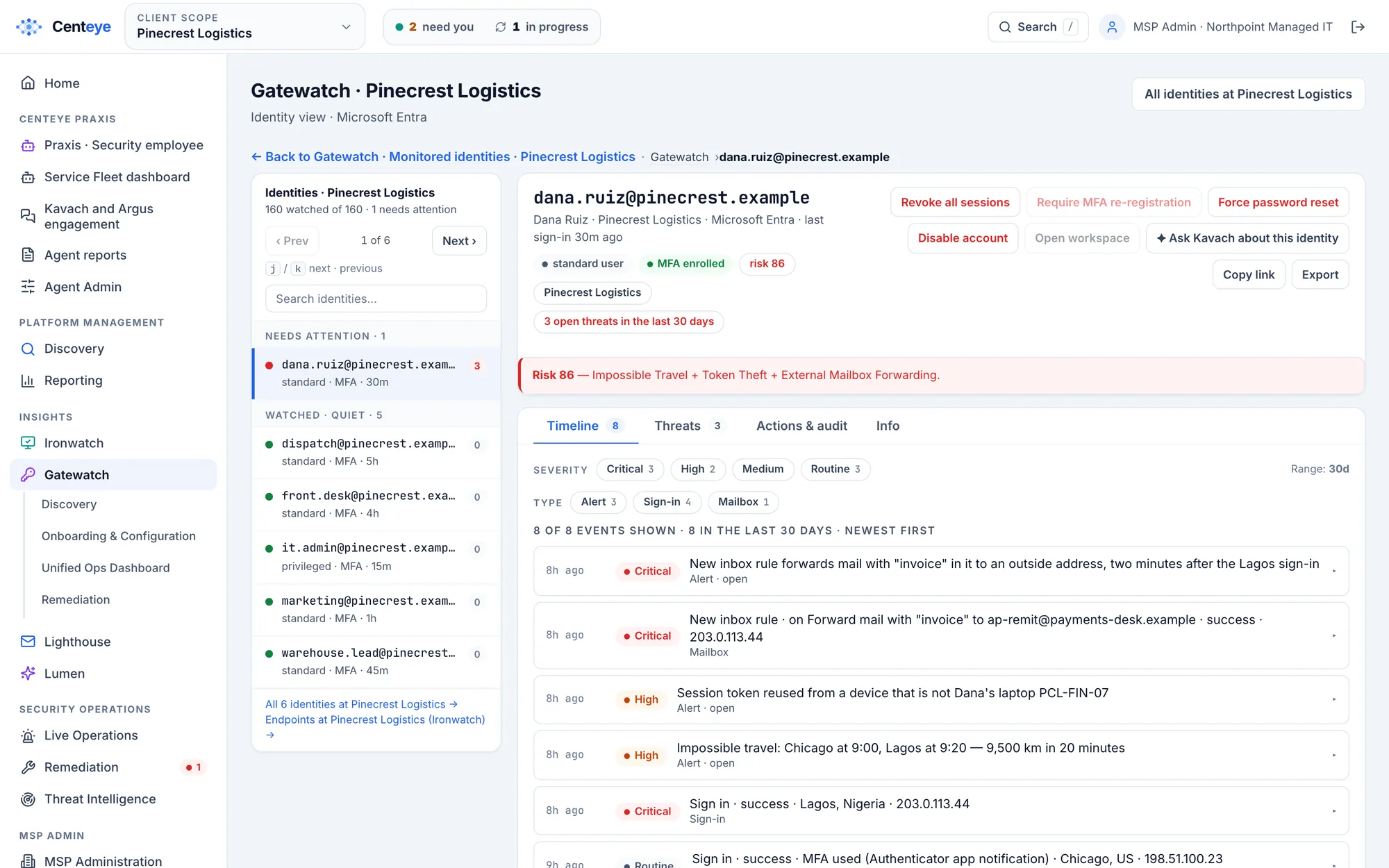
Gatewatch identity page for a sample user: risk 86 from impossible travel, token theft and mail forwarding, with buttons to revoke sessions, reset the password or disable the account.
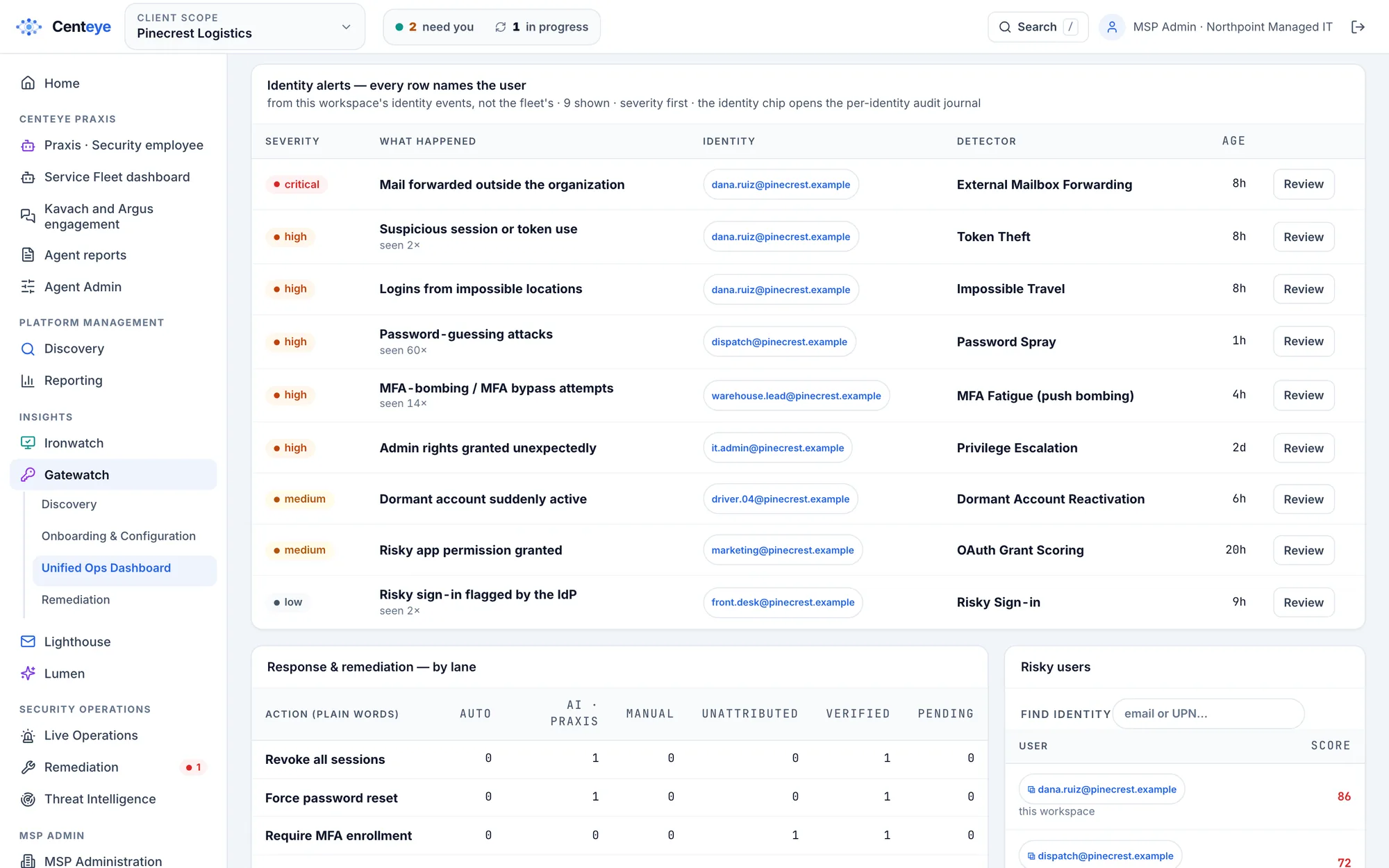
One account, the whole story. Sign-ins, inbox rules and alerts for one person on one timeline, with the reason behind the risk score and the fixes one click away.Real Centeye screen · sample data, client names are made upFull size ↗

Under the hood

What Centeye Gatewatch reads, and how it gets sharper.

What it reads

Sign-in records
Where, when, from which device and browser, into which app, and how the person proved who they were.
Directory changes
New admins, new sign-in methods, password resets, and accounts switched on or off.
Mailbox settings
Inbox rules, forwarding, and who has been given access to whose mailbox.
App grants
Every app and service account with access to mail, files or the directory, and who approved it.
AI assistant access
When an AI assistant such as Microsoft Copilot opens files on a person’s behalf.

How detection gets stronger

It learns each person’s normal
Usual places, devices and hours, so a real business trip doesn’t wake anyone at 3 am.
It reads what happened next
An odd login alone is a question. The same login followed by a forwarding rule is an attack.
It knows the networks attackers rent
Anonymising services and hosting networks are recognised on sight.
It hears from email
A phishing email the person received an hour earlier raises the weight of their next odd login.
It checks the device
Centeye Ironwatch tells it whether the session came from a known, healthy laptop.
It learns from you
Tell it a call was wrong and it gets more careful for that client from then on.

How it works

It detects, connects the dots, and fixes it.

Gatewatch doesn’t stop at an alert. Praxis links what it finds to the rest of the attack, then fixes it at the setting you choose.

  1. 01

    Detects

    Spots what is wrong, as it happens.

    • Sign-ins that aren’t the person
    • Password and MFA attacks
    • Accounts gaining power
  2. 02

    Connects the dots

    Links it to everything related, in one case.

    • The mailbox rules set after the login
    • The laptop the session came from
    • The AI apps the person connected
  3. 03

    Fixes it

    On your dial: tells you, asks first, or handles it.

    • End every session
    • Reset the password and sign-in methods
    • Remove what the attacker added
On your dial Tell me Centeye finds it, explains it and recommends the fix. You do the rest.Ask me first Centeye prepares the fix and runs it the moment you approve, from a phone if needed.Handle it Centeye fixes it on its own, checks it worked, and tells you after.

In action

Centeye Gatewatch in action.

Pick a case to see what happened, what Centeye saw, and what it did.

Two places at once

Monday, 9:12 am

  1. What happened

    The finance manager signs in from the office. A minute later her account signs in again from another country, with a session copied from a fake login page.

  2. What Centeye saw

    Gatewatch sees the impossible trip and a session that doesn’t match her laptop. It finds a new rule forwarding invoices to an outside address, set two minutes after the second login.

  3. What it did

    Every session ends, the password resets and the forwarding rule is removed. She gets a short “was this you?” message, and the case lands with everything attached.

What Gatewatch sees across the businesses we protect

  • 63 countries

    tried to sign in to the businesses we protect in 30 days. Only one in five foreign attempts came from a known hosting, VPN or Tor network.

    Blocking countries isn’t enough

    Most attempts came from ordinary home and mobile addresses, the kind a country block or VPN list lets straight through. Centeye judges an address by behaviour, not location: new to this business, trying many accounts, failing in a pattern.

    The fix
    • Flagged by behaviour
    • The fix goes to your team with the evidence
  • 1 in 3

    accounts hold an admin role at a 9-person business we watch. The smallest teams have the most admins for their size.

    Too many people with admin rights

    At a small company one stolen admin account is the whole company. Centeye lists every account with an admin role and flags a new admin grant the moment it happens.

    The fix
    • Remove the admin role for now
    • Can be undone
    • Waits for your approval

Source: Centeye platform data across the businesses Centeye protects, October 2026. Sign-in attempts counted over the last 30 days. No client is named.

See the same picture for one tenant: run the free Identity Exposure Check →

Getting started

Try Centeye Gatewatch on your own tenant.

Connects to Microsoft Entra ID or Google Workspace with one admin sign-in. Nothing to install on laptops, and most tenants are connected in under 10 minutes.