
Watch. Link. Ask. Act. Prove.
Your business now runs on people and AI agents. Centeye secures both the same way: what it sees, how it decides it’s one problem, who it asks, what it does, and how it shows the fix held.
Two sides of the same problem
People and AI agents both hold the keys now.
People
Attackers come in as someone you trust.
- Passwords guessed or stolen, and sessions replayed from somewhere else
- Phishing and fake invoices that look like a colleague or a supplier
- A laptop hit at 2 a.m., spreading before anyone is awake
- AI tools people connect to their mail and files, with nobody watching what they reach
Covered by Gatewatch, Ironwatch, Lighthouse and Lumen
AI agents
New workers with access and no manager.
- Agents built in an afternoon, with no owner and no review date
- More access than the job needs, often borrowed from the person who built them
- An agent that starts doing things it has never done, at machine speed
- Copilots and connected apps passing company data between SaaS tools
Covered by Synthwatch and Lumen · Synthwatch is in early access
One platform, one console and one way of working for both, with Praxis above them: the same five steps, whether the problem starts with a person or an agent. And when an attacker gets into a person’s account, the agents that person owns are part of the same case.
One case, end to end
Watch. Link. Ask. Act. Prove.
- WatchT+0
Gatewatch, Ironwatch, Lighthouse, Lumen and Synthwatch read sign-ins, devices, mail, AI use and AI agents, by API and a light agent.
- LinkT+2 min
Kavach, the Praxis analyst, joins the signals that belong together into one case: the person, their device, their mail, the AI tools and agents they connected.
- AskT+5 min
It proposes the fix with the evidence attached and asks the right person, in the console, Slack, Teams or email.
- ActT+9 min
It runs each step the way you set: on its own, after an approval, or left for you to do by hand.
- ProveDay 1
Every step is checked at the provider afterwards and written to the record. Argus drafts the plain-English summary.
- Watch
2:14 PM Session for dana@clientco replayed from a proxy
Gatewatch.
- Link
2:16 PM Forwarding rule on her mailbox · AI note-taker she connected
Lighthouse and Lumen, joined into one case.
- Ask
2:18 PM Revoke sessions · remove the rule · revoke the note-taker
Sent to the on-call approver in Teams.
- Act
2:20 PM All three steps run
Two after approval, one automatic.
- Prove
2:21 PM Confirmed at Microsoft · recorded
Argus drafted the summary for the weekly report.
- WatchT+0
Synthwatch and Lumen keep a register of every AI agent: who owns it, its identity, what it can reach and what it normally does.
- LinkT+2 min
Kavach joins the agent, the person who owns it, the access it was given and the data it touched into one case, together with anything odd on the owner’s own account.
- AskT+5 min
It proposes the fix with the evidence attached and asks the agent’s owner and your approver, in the console, Slack, Teams or email.
- ActT+9 min
It runs each step the way you set: pause the agent, revoke the access it should never have had, or leave it for a person.
- ProveDay 1
Every step is checked at Microsoft or Google afterwards and written to the record. Argus explains it in plain English.
- Watch
10:02 AM Invoice agent reading the payroll folder for the first time
Synthwatch. Owner: Dana in finance.
- Link
10:04 AM New grant to an outside file-sharing app · 212 files reached
Lumen and Synthwatch, joined into one case.
- Ask
10:06 AM Pause the agent · revoke the new grant
Sent to Dana and the on-call approver in Teams.
- Act
10:08 AM Agent paused · grant revoked
Both after approval.
- Prove
10:09 AM Confirmed at Microsoft · recorded
Argus explained what the agent did, for Dana and the weekly report.
The attacker rides one line. Centeye is at every stop.
A lure, a stolen login and a payload look small one at a time. Joined, they’re one attack you can contain in one coordinated response.
In the console
You make the call, in one click.
What Act looks like in the Centeye console: what is already done, what waits for you, and how to undo it. A real screen from the Centeye console. The client, people and data in it are made up.
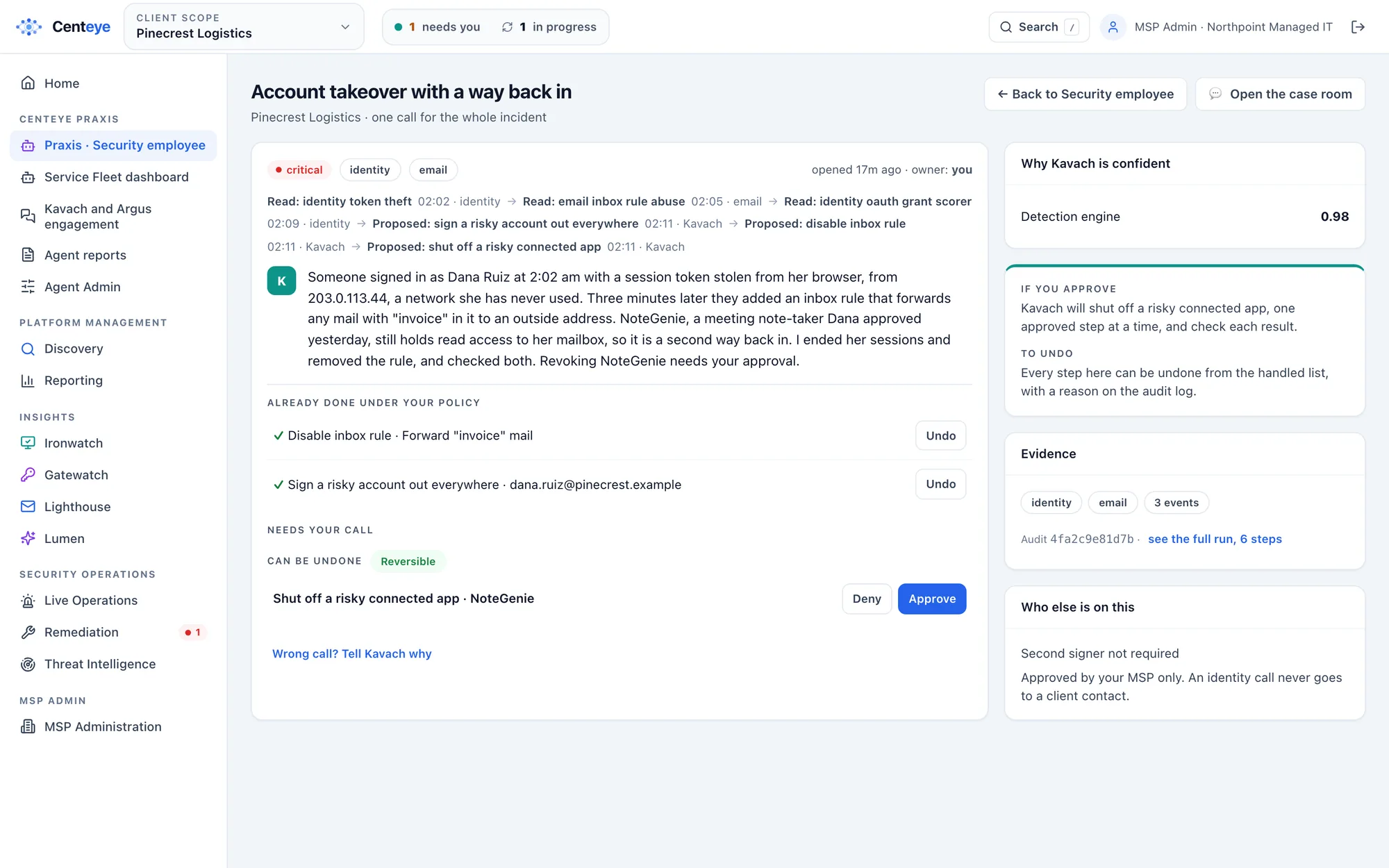
You decide how much it does on its own.
Set per action, and for MSPs per client, with templates so you set it once.
- Recommend only
- Centeye says what it would do and why. Nothing runs.
- Manual
- Centeye prepares the step; a person runs it.
- Ask first
- Centeye runs the step after one approval, from a phone if needed.
- Automatic
- Centeye runs the step on its own, then checks it worked. For clear-cut steps only.
Built to be trusted to act.
How Centeye is built covers the rest: tenant isolation, access and what it never reads.
- Risky steps never run on their own, whatever the setting.
- Client-wide critical steps, like forcing a reboot, need two approvers.
- Every action is checked at the provider afterwards, and undone where the provider allows.
- Every step is recorded: who, what, why and when, in a tamper-evident chain.
- Agent-run remediation sits behind a switch that is off by default.
- Centeye’s own AI agents work only through governed tools, inside your rules, like any other agent it watches.
Microsoft and Google by API. Laptops by a light agent.
Microsoft 365 and Entra ID, Google Workspace, Copilot and Gemini, Windows and macOS, Chrome and Edge. Tickets to standard PSA tools; alerts and approvals in Slack, Microsoft Teams and email. All integrations · Every feature
Watch it on your own tenant.
Start a free trial in watch-only mode, or book a 30-minute call and we’ll walk this case through live.